Case Study

Tutify — Building a Custom Online Tutoring Platform for GCC Education Operations

TuSpireTech built a custom admin portal and tutoring platform to help Tutify manage students, teachers, session cycles, delivered hours, leads, quizzes, PTMs, and marketing integrations in one connected system.

A live GCC-focused education platform built, maintained, and operated by our team.
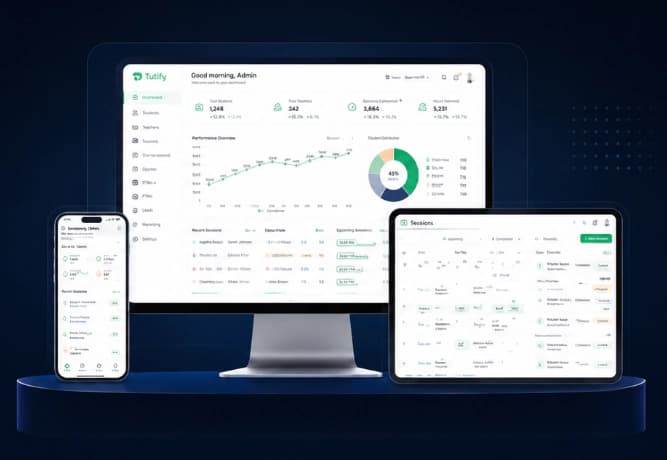
Tutify platform on desktop, tablet, and mobile showing admin dashboard and sessions views

Project Snapshot

Industry
EdTech
Region
GCC
Platform Type
Online Tutoring Platform
Services
Product Development, UI/UX, Backend, Integrations
Users
Admins, Teachers, Founders

The business behind Tutify

Tutify is a live GCC-focused education operations platform used to run day-to-day tutoring work — not a concept demo. TuSpireTech built the system, continues to maintain it, and operates it alongside the Tutify team as tutoring activity scales.

The platform supports admin staff, tutors, students, and parents through connected workflows for sessions, academic cycles, delivered hours, leads, assessments, parent meetings, and reporting. Where a workflow touches more than one role, the system keeps that context in one place instead of splitting it across tools.

1,000+
Students served through Tutify
100+
Concurrent portal users supported
4 years
Live GCC-focused Tutify operations

The operational challenge

As tutoring activity grew, disconnected tools became harder to manage. WhatsApp threads, spreadsheets, and manual follow-ups made it difficult to keep accurate records across tutor coordination, student information, sessions, delivered hours, quizzes, parent-teacher meetings, billing visibility, leads, parent communication, and reporting.

The team needed one operational system that admins could trust day to day — the same kind of custom software development for UAE businesses and GCC operators often need when WhatsApp and Excel stop scaling.

What the platform needed to manage

We mapped the platform around recurring operational areas before building individual modules:

  • Tutor operations
  • Student records
  • Delivered hours
  • Lead tracking
  • Quiz monitoring
  • PTM scheduling
  • Parent communication
  • Reporting and attribution

Before and after

Before

  • Scattered tutor coordination across chats and spreadsheets
  • Manual delivered-hour reconciliation
  • Leads spread across disconnected messages
  • PTM scheduling through repeated WhatsApp back-and-forth
  • Limited reporting visibility for day-to-day decisions

After

  • Central tutor operations in one admin workflow
  • Structured delivered-hour records for billing review
  • Trackable lead pipeline for new and returning families
  • Organized PTM booking and confirmation flow
  • Clearer operational dashboard for the admin team

How daily operations work

Each role interacts with the same underlying records, but with a different operational focus:

Admin team

Runs cycles, sessions, delivered hours, leads, quizzes, PTMs, and reporting from one connected admin portal.

Tutors

Work within assigned cycles, record session notes, and follow structured academic workflows tied to each student.

Parents

Receive clearer communication around PTMs, progress, and coordination without relying on scattered message threads.

Founders

Review operational visibility across tutoring activity, leads, and marketing attribution without stitching tools together manually.

How the platform evolved

Tutify was not planned as one giant first release. The platform grew in phases as real operating problems appeared — first core admin and academic coordination, then delivered hours and leads, then parent-facing workflows, assessments, and marketing attribution.

Each module on this page was added when the team hit a repeatable friction point. That kept delivery practical and made sure new features connected to workflows people were already trying to run.

What we learned from operating the platform

  • Software should follow real workflows, not the other way around.
  • Clean data capture comes before useful dashboards.
  • Operational systems should be introduced in phases.
  • Parent communication should reduce manual coordination, not add another channel to manage.
  • Not every education business needs a large ERP from day one.

What changed after the platform was introduced

We are not claiming fixed percentages or conversion lifts. In day-to-day operations, the team reported practical improvements such as:

  • Clearer visibility into tutor activity and cycle status
  • Easier delivered-hour reconciliation for billing review
  • More organized parent communication around PTMs and follow-ups
  • Improved lead tracking for new and returning families
  • Better reporting for operations and marketing attribution
  • Reduced dependence on disconnected spreadsheets and chat threads

Technologies & Tools

SupabasePostgreSQLJavaScriptHTML/CSSMeta PixelMeta CAPIWhatsAppAnalyticsResponsive UI

Platform Story

Key Features Built Around Real Tutoring Operations

The platform was designed as a practical business management system for tutoring operations, replacing scattered coordination with one connected workflow. Each module was then shaped around a recurring operational problem: reducing manual work, improving visibility, and keeping academic coordination easier to manage as the platform grows.

This is the same type of workflow problem many UAE SMEs face when operations are spread across WhatsApp, Excel, and manual follow-ups.

Interface screens have been recreated with sample data to protect user privacy.

Feature 01

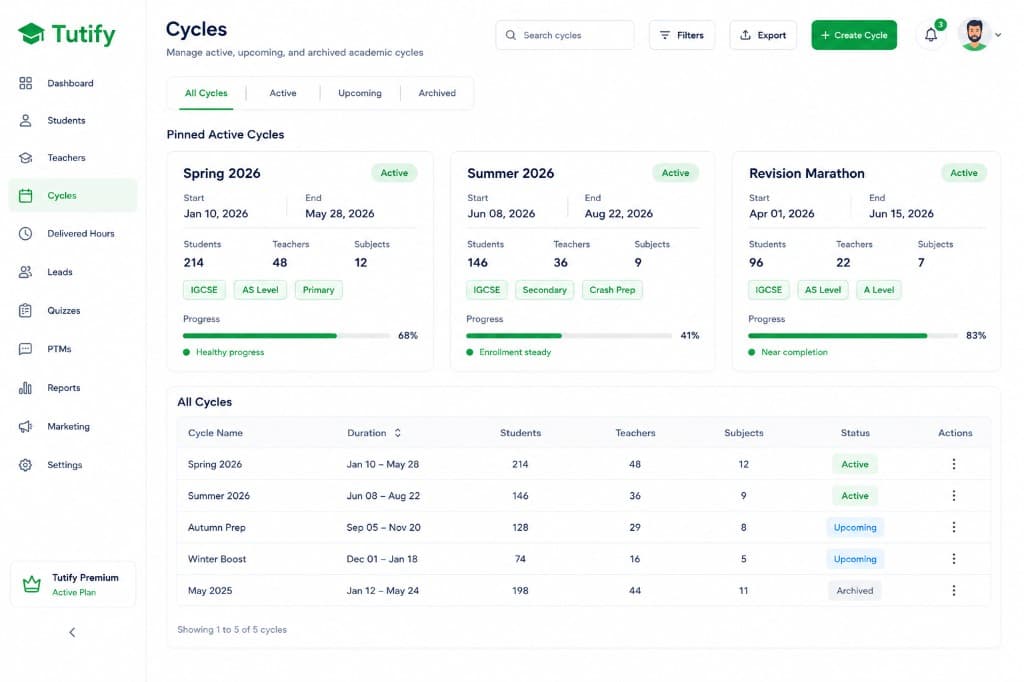
Cycle-Based Session Management for Smoother Academic Operations

Managing multiple teaching cycles across subjects, teachers, and students becomes difficult when active work is scattered across spreadsheets and disconnected records.

Our Solution

  • Built structured cycle cards with active cycles pinned for quick access.
  • Added teacher assignment, subject mapping, filters, and clear cycle statuses.
  • Preserved operational context so admins can return to the same filtered view.

Impact on Operations

  • Faster visibility into active cycles and assignments.
  • Lower risk of editing the wrong academic cycle.
  • Easier day-to-day coordination across subjects and teachers.
Cycle management dashboard for active and upcoming tutoring cycles

Feature 02

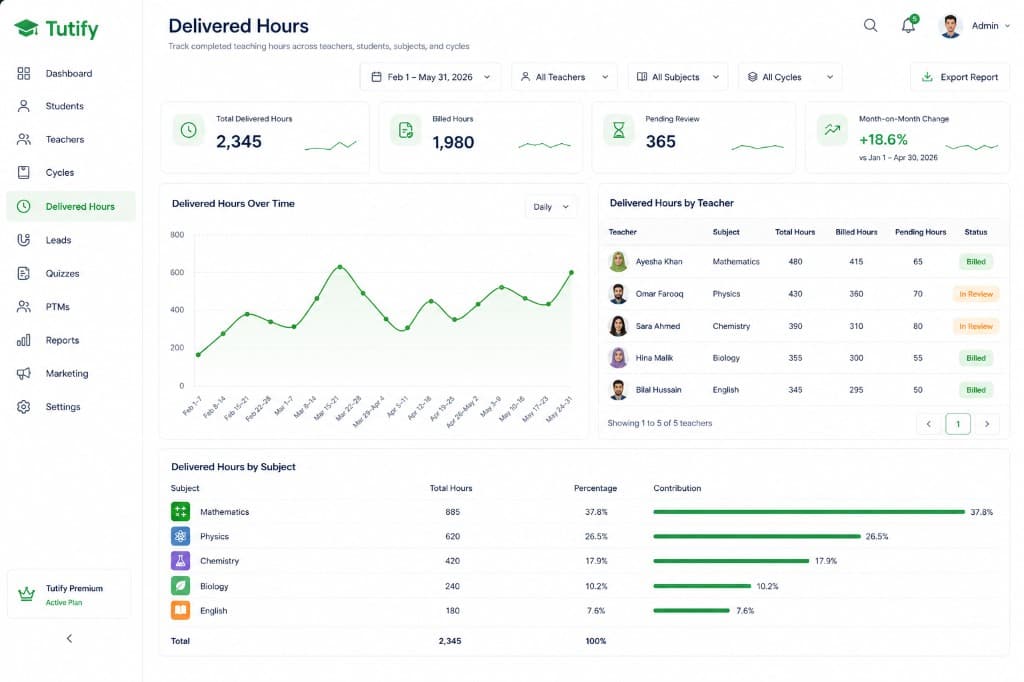
Delivered Hours Tracking for Clearer Billing and Accountability

The admin team needed a dashboard for live visibility into sessions, tutor activity, payments, and operational follow-ups. Delivered teaching hours also affect billing and accountability, and manual reconciliation made reporting slower and more error-prone.

Our Solution

  • Centralized delivered-hours tracking across teachers, students, subjects, and cycles.
  • Added filtering and reporting views for quicker review.
  • Structured queries to retrieve complete session histories reliably as records grow.

Impact on Operations

  • Clearer billing visibility.
  • Reduced manual reconciliation work.
  • More reliable reporting for teacher and student records.
Delivered hours reporting dashboard with filters and billing breakdown

Feature 03

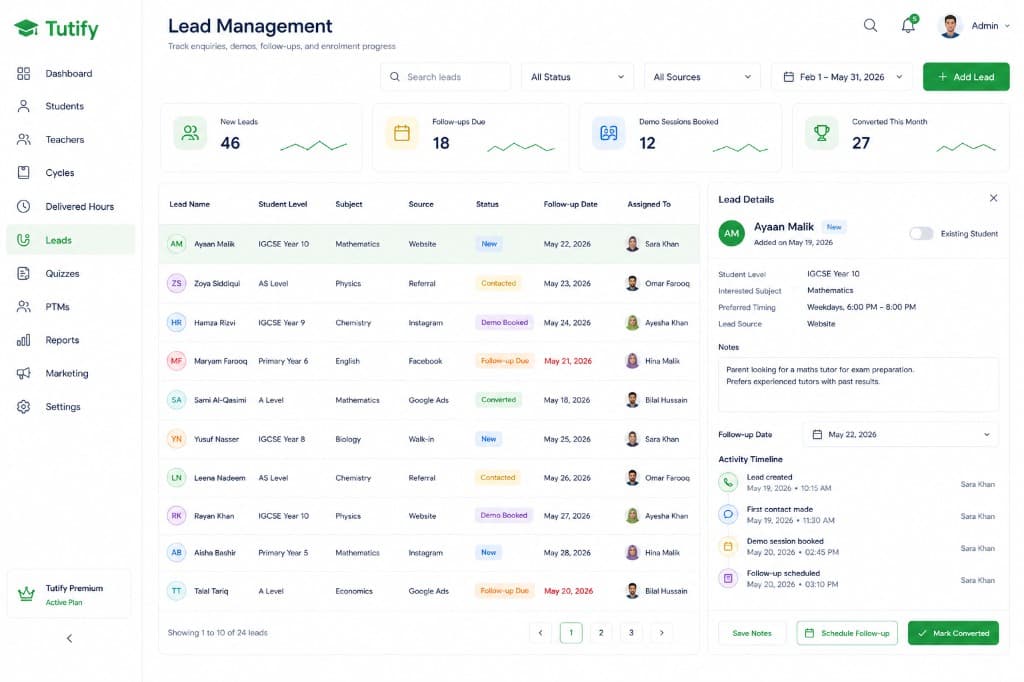
Lead Management for New and Returning Families

A new family enquiry requires a different workflow from an existing student requesting an additional subject or a teacher change.

Our Solution

  • Built a unified lead-management module with an existing-student toggle.
  • Added lead statuses, follow-up fields, notes, and assignment visibility.
  • Structured the workflow so returning families avoid unnecessary onboarding steps.

Impact on Operations

  • Cleaner lead handling.
  • Fewer enquiries lost in scattered messages.
  • More efficient follow-up for both new and returning families.
Lead management interface for new and returning families

Feature 04

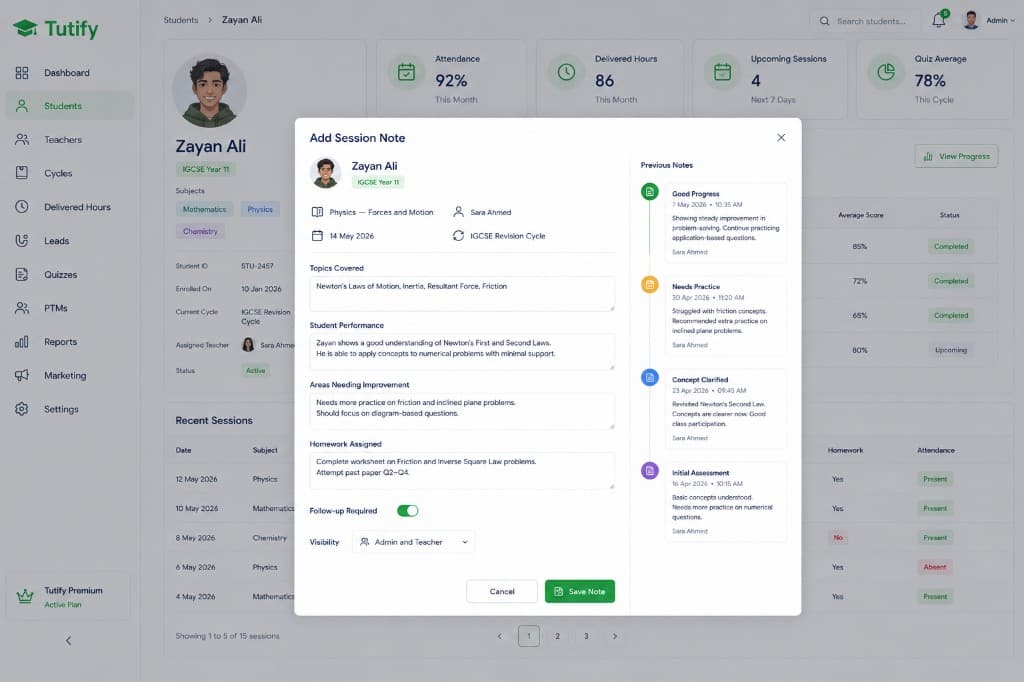
Contextual Teacher Notes for Better Student Progress Tracking

Session feedback becomes difficult to track when notes remain in WhatsApp messages or disconnected documents.

Our Solution

  • Built a session-linked teacher-notes interface.
  • Connected notes to the relevant student, teacher, session, and cycle.
  • Added timestamps and structured fields for consistent progress tracking.

Impact on Operations

  • A clearer record of student progress.
  • Less dependence on scattered messages.
  • A stronger foundation for parent-facing reporting.
Teacher notes panel linked to student sessions

Feature 05

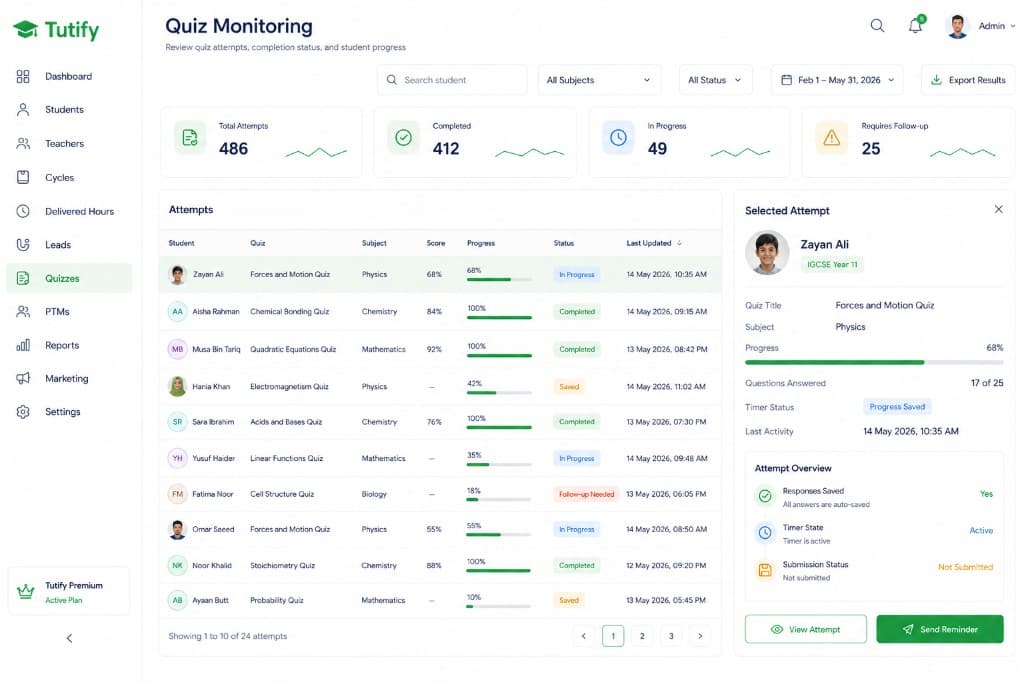
Persistent Quiz State for More Reliable Assessments

Students may navigate away or interrupt an attempt before completion. Losing quiz progress creates friction for students and extra work for admins.

Our Solution

  • Preserved quiz progress across navigation events.
  • Made incomplete attempts visible to administrators.
  • Added clear statuses for completed, saved, and follow-up-required attempts.

Impact on Operations

  • Lower risk of lost quiz progress.
  • Better visibility into incomplete attempts.
  • More structured follow-up with students.
Quiz monitoring dashboard with saved and incomplete attempts

Feature 06

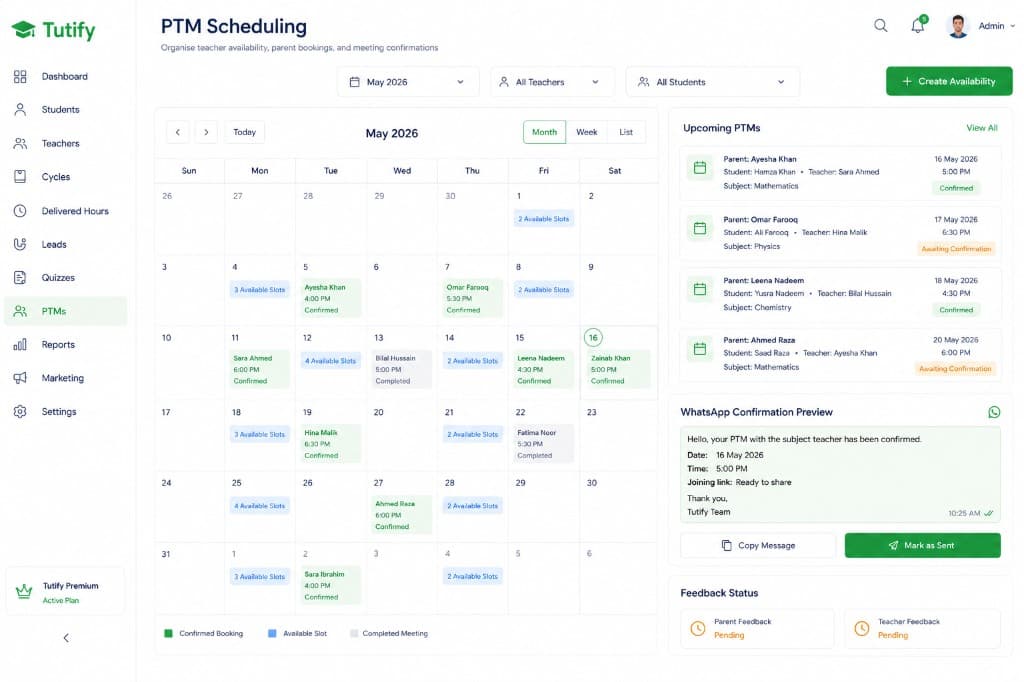
PTM Scheduling With Ready-to-Send WhatsApp Confirmations

Parent-teacher meetings previously required repeated WhatsApp coordination, manual confirmation, and follow-up.

Our Solution

  • Built teacher availability and slot-booking workflows.
  • Added ready-to-send WhatsApp confirmation messages.
  • Structured parent and teacher feedback after meetings.

Impact on Operations

  • Less back-and-forth coordination.
  • Clearer booking visibility.
  • More consistent post-meeting feedback records.
PTM scheduling dashboard with calendar, booking slots, and WhatsApp confirmations

Feature 07

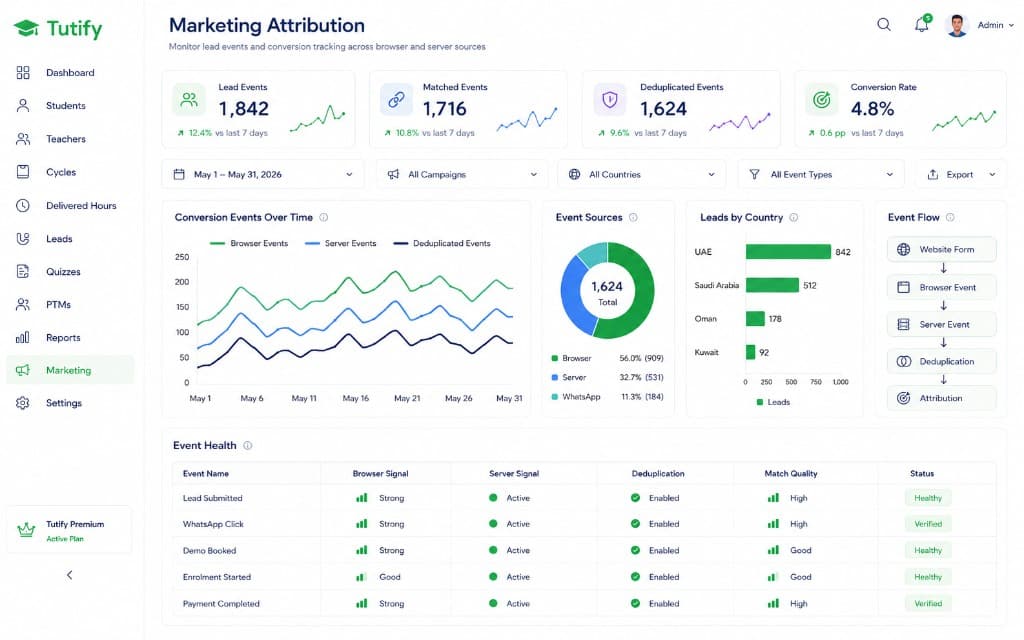
Cleaner Marketing Attribution With Pixel and Server-Side Events

Paid-campaign optimization becomes difficult when marketing events are inconsistent or duplicated across browser and server sources.

Our Solution

  • Improved Meta Pixel and Conversions API event handling.
  • Used matching event IDs to support cleaner deduplication.
  • Added stronger match parameters and validated event delivery before launch.

Impact on Operations

  • Cleaner campaign signals.
  • More dependable conversion tracking.
  • A stronger basis for ad optimization decisions.
Marketing attribution dashboard for pixel and server events

See how we scope and build custom systems

Outcomes

One Connected Operational Hub for Tutify

The portal brought core academic, administrative, and marketing workflows into one connected system. It gave the team clearer visibility while reducing dependence on scattered spreadsheets, messages, and manual coordination.

Centralized academic operations
Clearer delivered-hours visibility
Structured lead follow-up
Improved parent communication workflows
Cleaner marketing-event tracking

Want to discuss a similar system for your business?

We design and build custom platforms that replace scattered processes with a system your team can use every day.